PDF to Typst with the math as math.
Upload a PDF and get a .typ file back: the text, every equation written as Typst math, tables as #table and the figures beside it. It works on scanned PDFs, so a paper you only have as a PDF, or only on paper, can go on in Typst.
No file at hand? See a page before and after
- From
- Any PDF, scanned or digital, up to 20 MB on the free plan
- Back
- A .typ file and its figures, in a zip. The sample compiled with Typst 0.15.1 as it came
- Cost
- A quarter of a credit a page on every plan: about 200 pages a month free
Before and after
The page, as Typst.
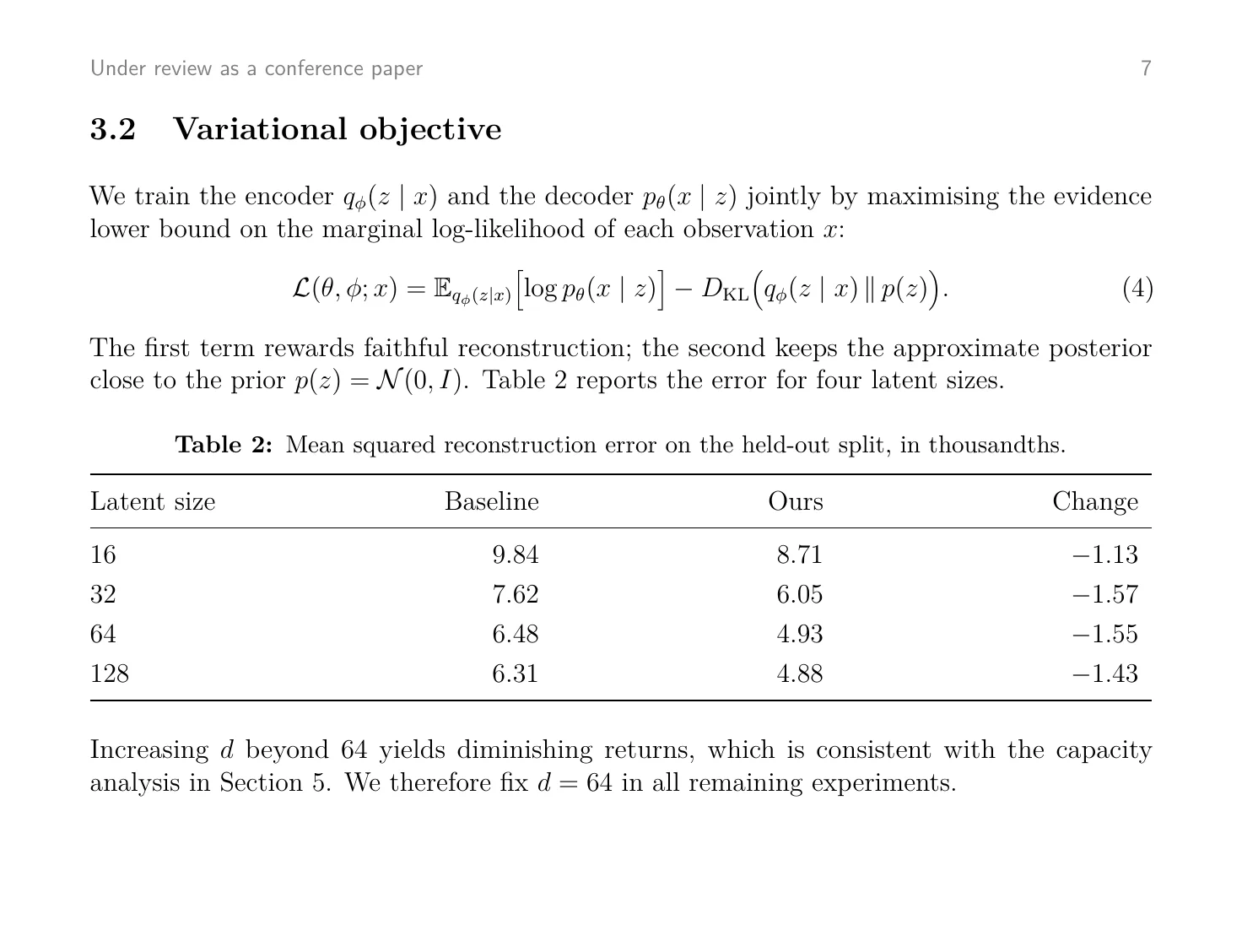
Drag the handle. Left of it is the PDF page that went in; right of it is the .typ file that came back for it, character for character.
- 01Equation 4 is display math in Typst's own notation: cal(L), bb(E), phi.alt.
- 02Table 2 is a #table: four columns, five rows, every number in its cell.
- 03The heading is a #heading with a label, and the symbols in the sentences are inline math.
#set text(font: ("Noto Serif CJK SC", "STIX Two Text"))
#heading(level: 1, numbering: none)[3.2 Variational objective]
<variational-objective>
We train the encoder $q_phi.alt (z divides x)$ and the decoder
$p_theta (x divides z)$ jointly by maximising the evidence lower bound
on the marginal log-likelihood of each observation $x$ :

$ cal(L) (theta \, phi.alt ; x) = bb(E)_(q_phi.alt (z divides x)) [log p_theta (x divides z)] - D_(upright(K L)) (q_phi.alt (z divides x) parallel p (z)) . #h(2em) upright("(4)") $

The first term rewards faithful reconstruction; the second keeps the
approximate posterior close to the prior $p (z) = cal(N) (0 \, I)$ .
Table 2 reports the error for four latent sizes.

Table 2: Mean squared reconstruction error on the held-out split, in
thousandths.

#block[
#figure(
  align(center)[#table(
    columns: 4,
    align: (center,center,center,center,),
    [Latent size], [Baseline], [Ours], [Change],
    [16], [9.84], [8.71], [-1.13],
    [32], [7.62], [6.05], [-1.57],
    [64], [6.48], [4.93], [-1.55],
    [128], [6.31], [4.88], [-1.43],
  )]
  , kind: table
  )

]
Increasing $d$ beyond 64 yields diminishing returns, which is consistent
with the capacity analysis in Section 5. We therefore fix $d = 64$ in
all remaining experiments.
Not a mock-up. The Typst view is the file Doc2X returned for the same page on 15 November 2026, character for character. Open the PDF that went in and the Typst file.
Why it holds together
Source you can go on writing in.
The pagePDF $ cal(L) (theta \, phi.alt ; x) = bb(E)_(q_phi.alt (z divides x)) [log p_theta (x divides z)] - D_(upright(K L)) (q_phi.alt (z divides x) parallel p (z)) . #h(2em) upright("(4)") $The same equation in converted.typ, as downloaded 01
Math is Typst math, not pictures
Every formula on the page is written the way Typst writes math: cal(L) for the script L, bb(E) for the expectation, subscripts and brackets as Typst has them. Display equations stand on their own lines; symbols inside sentences are inline math. Change a subscript and compile again.
The pagePDF #table( columns: 4, align: (center,center,center,center,), [Latent size], [Baseline], [Ours], [Change], [16], [9.84], [8.71], [-1.13], [32], [7.62], [6.05], [-1.57], [64], [6.48], [4.93], [-1.55], [128], [6.31], [4.88], [-1.43], )The same table in converted.typ, as downloaded 02
Tables are #table
A table comes back as a #table with one cell per value, its columns counted and aligned, inside a #figure. Add a row, change a number, or restyle every table of the document with one set rule.
- converted.typCompiled with Typst 0.15.1
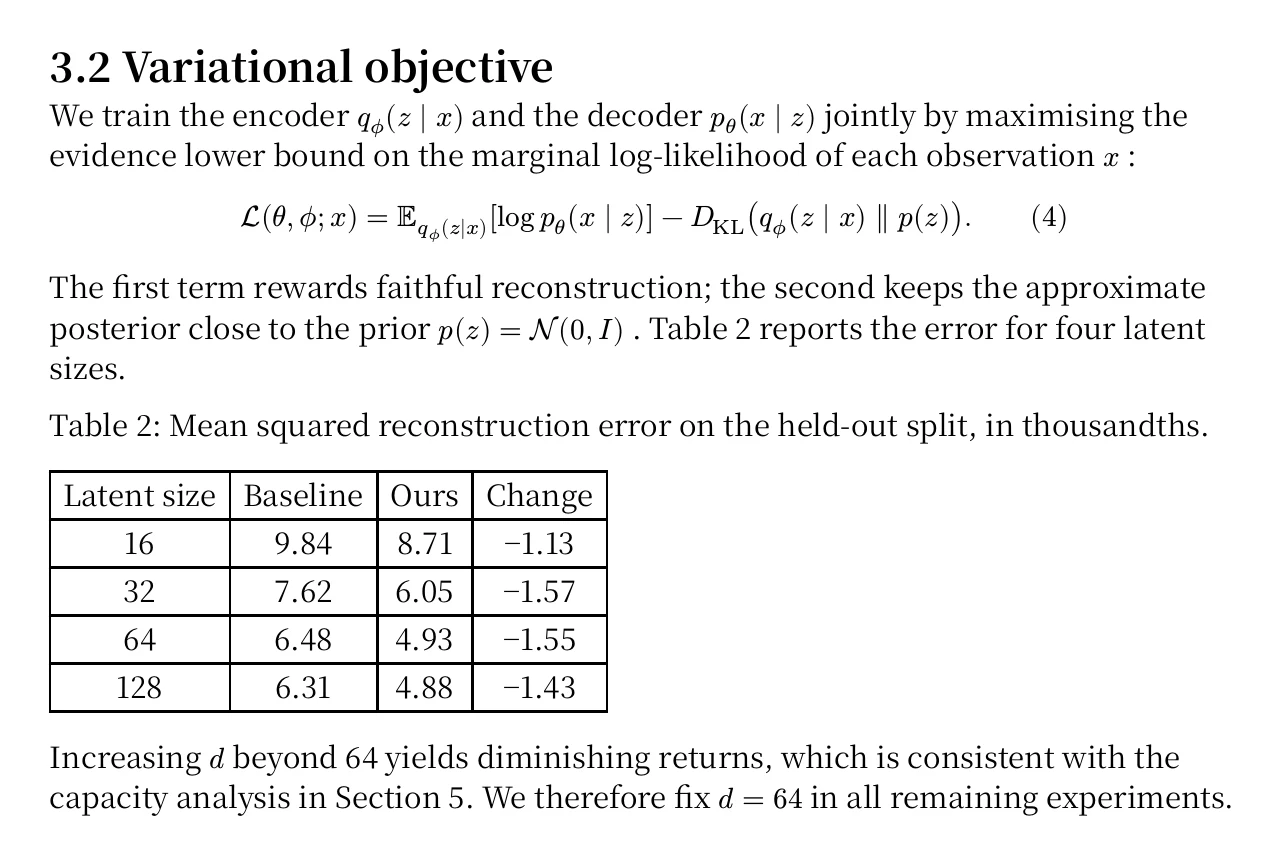
The downloaded file, compiled and nothing else done to it. No errors, no warnings. 03
It compiles as it comes
The file for the sample page compiled with Typst 0.15.1 on a Mac exactly as it was downloaded: no errors, no warnings. This is the page it made. The files of four other documents of ours compiled the same way. A fifth, which had a horizontal rule in it, needed one line added: the fine print says which.
- Wordconverted.docxEquations as Word equations, the table as a Word table
- Markdownconverted.mdFormulas in LaTeX, the table as rows and cells
- LaTeXconverted.texA whole document; compiles with XeLaTeX as it comes
- Typstconverted.typTypst math and a Typst table
The four files that came back for the sample page 04
One conversion, four files
A conversion is paid for once. Typst, LaTeX, Markdown and Word all come from it, so a co-author who has not moved to Typst can have the same pages as .tex or .docx without converting again.
How it works
Three steps from PDF to .typ.
01
Upload the PDF
Drop it into the box at the top of this page. Up to 20 MB on the free plan, 200 MB on Starter and 500 MB on Pro.
02
See what it costs, then start
The workbench counts the pages and shows the total before anything is taken: a quarter of a credit a page. The sample page took five seconds.
03
Check it, then download
The document opens as text beside the original PDF, formulas typeset, so you can check it page against page. Then download Typst: the dialog opens on it when you come from this page.
The fine print
What it takes and what it gives back.
Better to know before you upload. The last list is what it does not do today.
- Files
- PDF, digital or scanned. A picture of a page or of a formula (PNG, JPG or WebP) is taken too and goes in as a one-page PDF
- File size
- 20 MB on Free, 200 MB on Starter, 500 MB on Pro
- Document
- A .typ file: one line that sets the font of the text, then the content. Nothing is imported, and no page setup is made
- Headings
- #heading, each followed by a label you can refer to
- Equations
- Typst math: inline between dollar signs, display on a line of its own. The number of a numbered equation is typed at its end
- Tables
- #table inside a #figure, its columns counted and aligned
- Figures
- Image files in an images folder, placed with #image
- Compiler
- The file of the sample page compiled with Typst 0.15.1 as it came
- Fonts
- The first line asks for Noto Serif CJK SC, then STIX Two Text. Change that line to the font you write in
- Download
- A zip with the .typ file and its images. Word, Markdown and LaTeX from the same conversion, on every plan
- Cost
- A quarter of a credit a page; the total is shown before you start. The free plan has 50 credits a month, about 200 pages. A conversion that fails is not charged.
- Storage
- Uploaded files and results are deleted automatically within 31 days
Not a fit yet
- A horizontal rule. Where the page has one, the file says #horizontalrule, which Typst does not know by itself, and the file stops with "unknown variable". Add one line at the top and it compiles: #let horizontalrule = line(length: 100%)
- Typst's own numbering. The number of an equation is typed as text, a numbered list comes back as numbered paragraphs, and headings are not numbered.
- The original template. You get the content in Typst's plain layout, not the journal style or the two columns of the PDF.
- A bibliography as a .bib or Hayagriva file. References come back as the text that is on the page.
How do I convert a PDF to Typst?
Upload it here and start the conversion. Doc2X reads the structure of each page, writes the text, the equations and the tables out as Typst, and gives you a .typ file with its figures. You check it beside the original PDF before you download it.
Does the .typ file compile?
The file for the sample page on this site compiled with Typst 0.15.1, on a Mac, exactly as it was downloaded, without an error or a warning; so did the files of four other documents we tried. One file did not: its page had a horizontal rule, which comes back as #horizontalrule, and Typst does not define that. One line at the top of the file settles it: #let horizontalrule = line(length: 100%)
Can I move a LaTeX paper to Typst this way?
If you have its PDF, yes. The Typst is written from what is on the pages, not translated from your .tex source: your macros and packages are not carried over, and the result does not depend on them either. Equations come back as Typst math, tables as #table.
Can it get Typst out of a scanned paper?
Yes. Scanned pages are read with OCR that recognises formulas as formulas, and each one comes back as Typst math you can edit. The scanned copy of the sample page gave the same .typ file as the digital one, character for character.
Is it free?
The free plan gives you 50 credits every month and needs no card. Converting a page costs a quarter of a credit, about 200 pages a month. The total is shown before you start, and a conversion that fails is not charged.
Does it keep the layout of the PDF?
No, and that is deliberate: it gives you the content as source you can edit, in Typst's plain layout. If what you want is the same page in another language with the layout intact, that is what the PDF translator returns.
Which version of Typst do I need?
A current one: the sample compiled with Typst 0.15.1. The file uses what Typst has built in (headings, math, tables, figures, images) and imports no package.
Can I get a single formula as Typst?
Take a screenshot of the formula and convert that: a picture goes in as a one-page PDF, and the .typ file that comes back holds just the formula. In the reader, the toolbar of a formula copies it as LaTeX, not as Typst.
What happens to my file?
It is uploaded over an encrypted connection, used to produce your conversion, and deleted automatically within 31 days. Unless you explicitly agree, your files are not used to train AI models offered to the public or to other customers.
Go on writing, in Typst.
Start on the free plan. No card needed.