PDF to LaTeX with the equations as source.
Upload a PDF and get a .tex file back: a complete document with the text, every equation as LaTeX math, tables as tabular and the figures beside it. It works on scanned PDFs, so a paper you only have on paper can be edited again.
No file at hand? See a page before and after
- From
- Any PDF, scanned or digital, up to 20 MB on the free plan
- Back
- A .tex file and its figures, in a zip. Compiles with XeLaTeX as it comes
- Cost
- A quarter of a credit a page on every plan: about 200 pages a month free
Before and after
The page, as LaTeX.
Drag the handle. Left of it is the PDF page that went in; right of it is the body of the .tex file that came back for it, character for character.
- 01Equation 4 is display math, with its number kept as \tag{4}.
- 02Table 2 is a tabular: four columns, five rows, every number in its cell.
- 03The heading is a \section*, the symbols in the sentences are inline math.
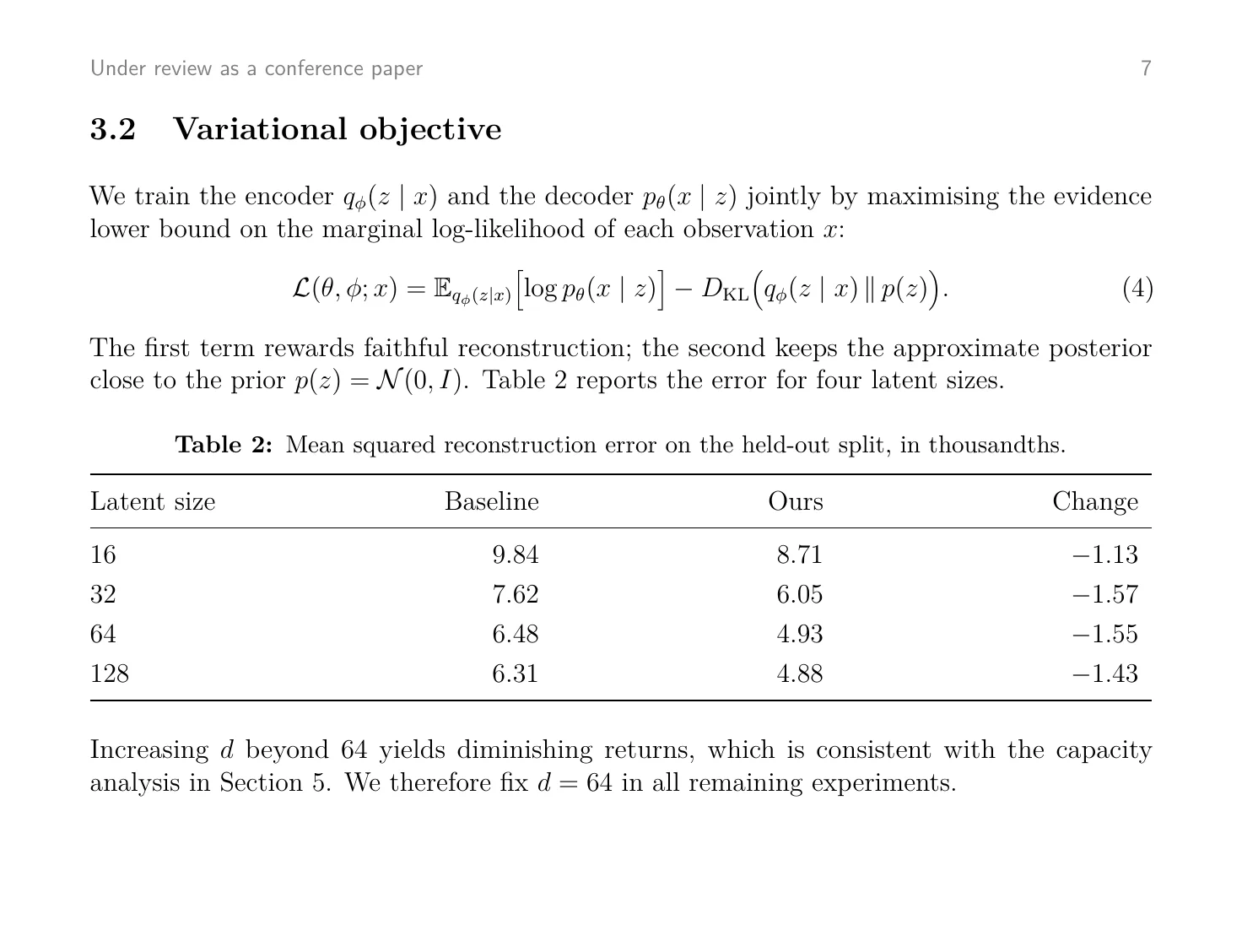
\section*{3.2 Variational objective}

We train the encoder \({q}_{\phi }\left( {z \mid  x}\right)\) and the decoder \({p}_{\theta }\left( {x \mid  z}\right)\) jointly by maximising the evidence lower bound on the marginal log-likelihood of each observation \(x\) :

\[
\mathcal{L}\left( {\theta ,\phi ;x}\right)  = {\mathbb{E}}_{{q}_{\phi }\left( {z \mid  x}\right) }\left\lbrack  {\log {p}_{\theta }\left( {x \mid  z}\right) }\right\rbrack   - {D}_{\mathrm{KL}}\left( {{q}_{\phi }\left( {z \mid  x}\right) \parallel p\left( z\right) }\right) .\tag{4}
\]

The first term rewards faithful reconstruction; the second keeps the approximate posterior close to the prior \(p\left( z\right)  = \mathcal{N}\left( {0,I}\right)\) . Table 2 reports the error for four latent sizes.

Table 2: Mean squared reconstruction error on the held-out split, in thousandths.

\begin{center}
\adjustbox{max width=\textwidth}{
\begin{tabular}{|c|c|c|c|}
\hline
Latent size & Baseline & Ours & Change \\
\cline{1-4}
16 & 9.84 & 8.71 & -1.13 \\
\cline{1-4}
32 & 7.62 & 6.05 & -1.57 \\
\cline{1-4}
64 & 6.48 & 4.93 & -1.55 \\
\cline{1-4}
128 & 6.31 & 4.88 & -1.43 \\
\cline{1-4}
\hline
\end{tabular}
}
\end{center}

Increasing \(d\) beyond 64 yields diminishing returns, which is consistent with the capacity analysis in Section 5. We therefore fix \(d = {64}\) in all remaining experiments.
Not a mock-up. The LaTeX view is the file Doc2X returned for the same page on 15 November 2026, character for character (of the LaTeX file, the part after the preamble). Open the PDF that went in and the LaTeX file.
Why it holds together
Source you can go on working in.
The pagePDF \[ \mathcal{L}\left( {\theta ,\phi ;x}\right) = {\mathbb{E}}_{{q}_{\phi }\left( {z \mid x}\right) }\left\lbrack {\log {p}_{\theta }\left( {x \mid z}\right) }\right\rbrack - {D}_{\mathrm{KL}}\left( {{q}_{\phi }\left( {z \mid x}\right) \parallel p\left( z\right) }\right) .\tag{4} \]The same equation in converted.tex, as downloaded 01
Equations are math, not pictures
Every formula on the page is written out as LaTeX math: display equations on their own lines with the number the authors gave them, symbols inside sentences as inline math. You can change a subscript and compile again.
The pagePDF \begin{tabular}{|c|c|c|c|} \hline Latent size & Baseline & Ours & Change \\ \cline{1-4} 16 & 9.84 & 8.71 & -1.13 \\ \cline{1-4} 32 & 7.62 & 6.05 & -1.57 \\ \cline{1-4} 64 & 6.48 & 4.93 & -1.55 \\ \cline{1-4} 128 & 6.31 & 4.88 & -1.43 \\ \cline{1-4} \hline \end{tabular}The same table in converted.tex, as downloaded 02
Tables are tabular
A table comes back as a tabular environment with one cell per value. The preamble already loads multirow, booktabs and tabularx for the tables that need them.
- Wordconverted.docxEquations as Word equations, the table as a Word table
- Markdownconverted.mdFormulas in LaTeX, the table as rows and cells
- LaTeXconverted.texA whole document; compiles with XeLaTeX as it comes
- Typstconverted.typTypst math and a Typst table
The four files that came back for the sample page 03
It compiles as it comes
The .tex file is a whole document: preamble, packages, body. The file for the sample page compiled with XeLaTeX on TeX Live 2023, on a Mac, without touching it. It uses fontspec and unicode-math, so it needs XeLaTeX or LuaLaTeX rather than pdfLaTeX.
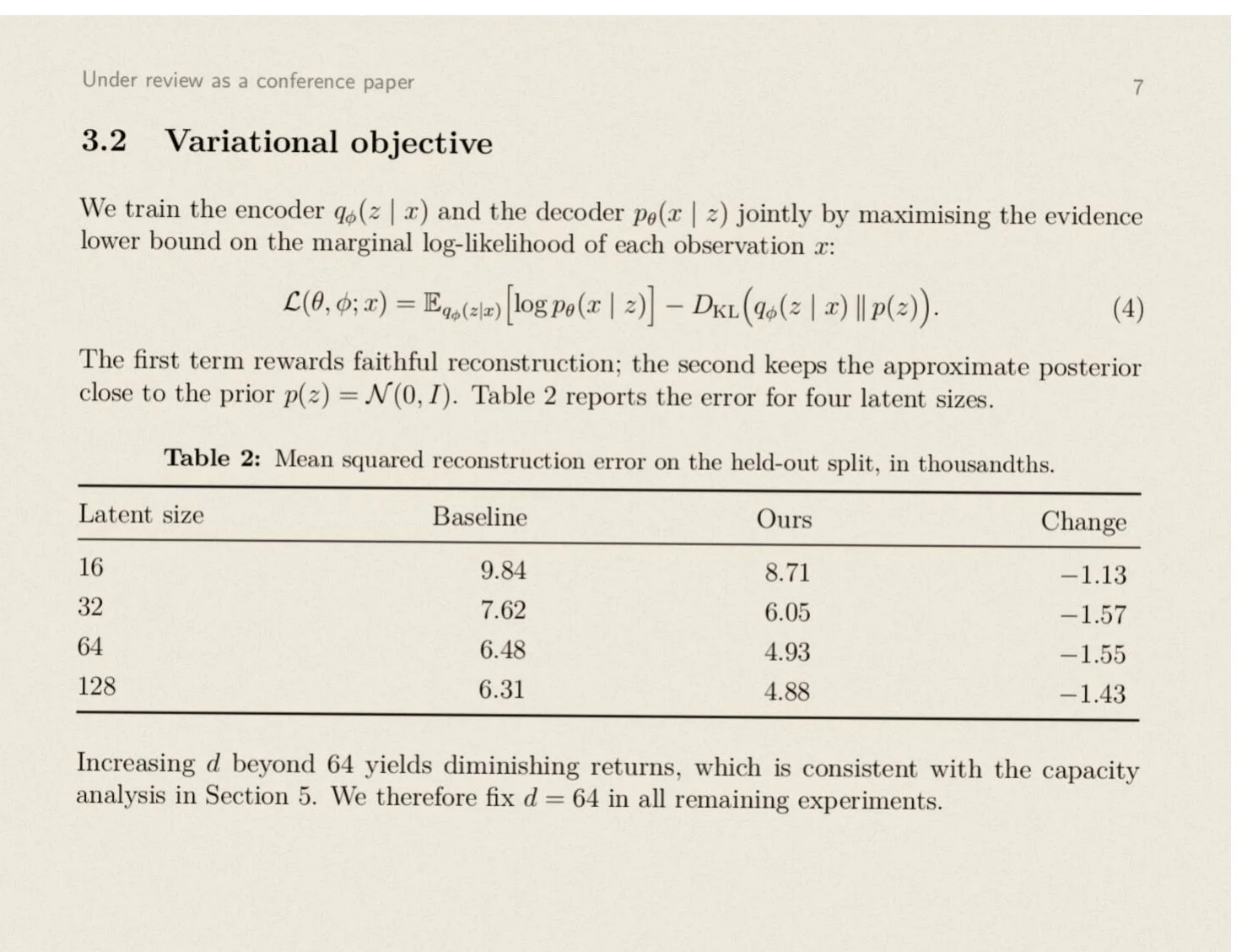
Scanned page, nothing to select ### 3.2 Variational objective We train the encoder \( {q}_{\phi }\left( {z \mid x}\right) \) and the decoder \( {p}_{\theta }\left( {x \mid z}\right) \) jointly by maximising the evidence lower bound on the marginal log-likelihood of each observation \( x \) :What came back for the scan: the same Markdown as for the digital page, character for character 04
Scans come back editable
A scanned paper has nothing to select, let alone to edit. Doc2X reads the print, the formulas and the tables off the page image, so what you only had as a photocopy becomes source again.
How it works
Three steps from PDF to .tex.
01
Upload the PDF
Drop it into the box at the top of this page. Up to 20 MB on the free plan, 200 MB on Starter and 500 MB on Pro.
02
See what it costs, then start
The workbench counts the pages and shows the total before anything is taken: a quarter of a credit a page. The sample page took five seconds.
03
Check it, then download
The document opens as text beside the original PDF, formulas typeset, so you can check it page against page. Then download LaTeX: the dialog opens on it when you come from this page.
The fine print
What it takes and what it gives back.
Better to know before you upload. The last list is what it does not do today.
- Files
- PDF, digital or scanned
- File size
- 20 MB on Free, 200 MB on Starter, 500 MB on Pro
- Document
- A complete .tex file: article class, preamble and body
- Equations
- Inline math \( \), display math \[ \], equation numbers as \tag
- Tables
- tabular; the preamble loads multirow, booktabs and tabularx
- Figures
- Image files in an images folder, included with \includegraphics
- Compiler
- XeLaTeX or LuaLaTeX (the preamble loads fontspec and unicode-math)
- Fonts
- STIX Two for text and math, which ships with TeX Live; Arial and Courier New for sans and mono. Where those two are missing, change two lines of the preamble
- Download
- A zip with the .tex file and its images. Word, Markdown and Typst from the same conversion, on every plan
- Cost
- A quarter of a credit a page; the total is shown before you start. The free plan has 50 credits a month, about 200 pages. A conversion that fails is not charged.
- Storage
- Uploaded files and results are deleted automatically within 31 days
Not a fit yet
- The original template. You get the content in a plain article layout, not the journal class or the two-column style of the PDF.
- Bibliographies as BibTeX. References come back as the text that is on the page.
- Photos and screenshots of a formula. Only PDFs are taken today.
- pdfLaTeX without changes: the preamble is written for XeLaTeX and LuaLaTeX.
How do I convert a PDF to LaTeX?
Upload it here and start the conversion. Doc2X reads the structure of each page, writes the text, the equations and the tables out as LaTeX, and gives you a .tex file with its figures. You check it beside the original PDF before you download it.
Does the .tex file compile?
It is a complete document with its own preamble. The file for the sample page on this site compiled with XeLaTeX on TeX Live 2023, on a Mac, exactly as it was downloaded. Because the preamble uses fontspec and unicode-math, compile with XeLaTeX or LuaLaTeX. It asks for the fonts STIX Two, Arial and Courier New; on a system without Arial or Courier New, change those two lines.
Can it get the LaTeX of an equation out of a scanned paper?
Yes. Scanned pages are read with OCR that recognises formulas as formulas. Each one comes back as LaTeX math you can copy or edit.
Is it free?
The free plan gives you 50 credits every month and needs no card. Converting a page costs a quarter of a credit, about 200 pages a month. The total is shown before you start, and a conversion that fails is not charged.
Does it keep the layout of the PDF?
No, and that is deliberate: it gives you the content as editable source in a plain article layout. If what you want is the same page in another language with the layout intact, that is what the PDF translator returns.
Which packages does the file use?
fontspec and unicode-math for fonts, amsmath and amssymb for math, graphicx for figures, booktabs, multirow and tabularx for tables, hyperref for links, and a few more. All of them are part of TeX Live and MiKTeX.
Can I get only the formulas?
The conversion returns the whole document, but you do not have to download it for one formula: in the reader, click any formula and choose LaTeX to copy just that one.
What happens to my file?
It is uploaded over an encrypted connection, used to produce your conversion, and deleted automatically within 31 days. Unless you explicitly agree, your files are not used to train AI models offered to the public or to other customers.
Get the source back.
Start on the free plan. No card needed.