Read any research paper in your language.
Two columns, numbered equations, a table across the full page, forty references. Doc2X translates the paper and keeps all of it where the authors put it, so equation (12) is still equation (12) and reference [31] is still reference [31].
No file at hand? See a page before and after
- Keeps
- Two-column layout, equation numbers, tables, figures and reference lists
- Into
- 11 languages, from English and Spanish to Japanese and Korean
- Reads
- Side by side with the original, the two scrolling together
A page from a paper
Equation numbers and tables stay put.
Drag the handle across a page with a numbered equation and a results table. Everything that is not prose is identical on both sides.
- 01The equation keeps its number, so cross-references still make sense.
- 02The results table keeps its columns and every number in it.
- 03Symbols in running text are typeset, not replaced by look-alike characters.
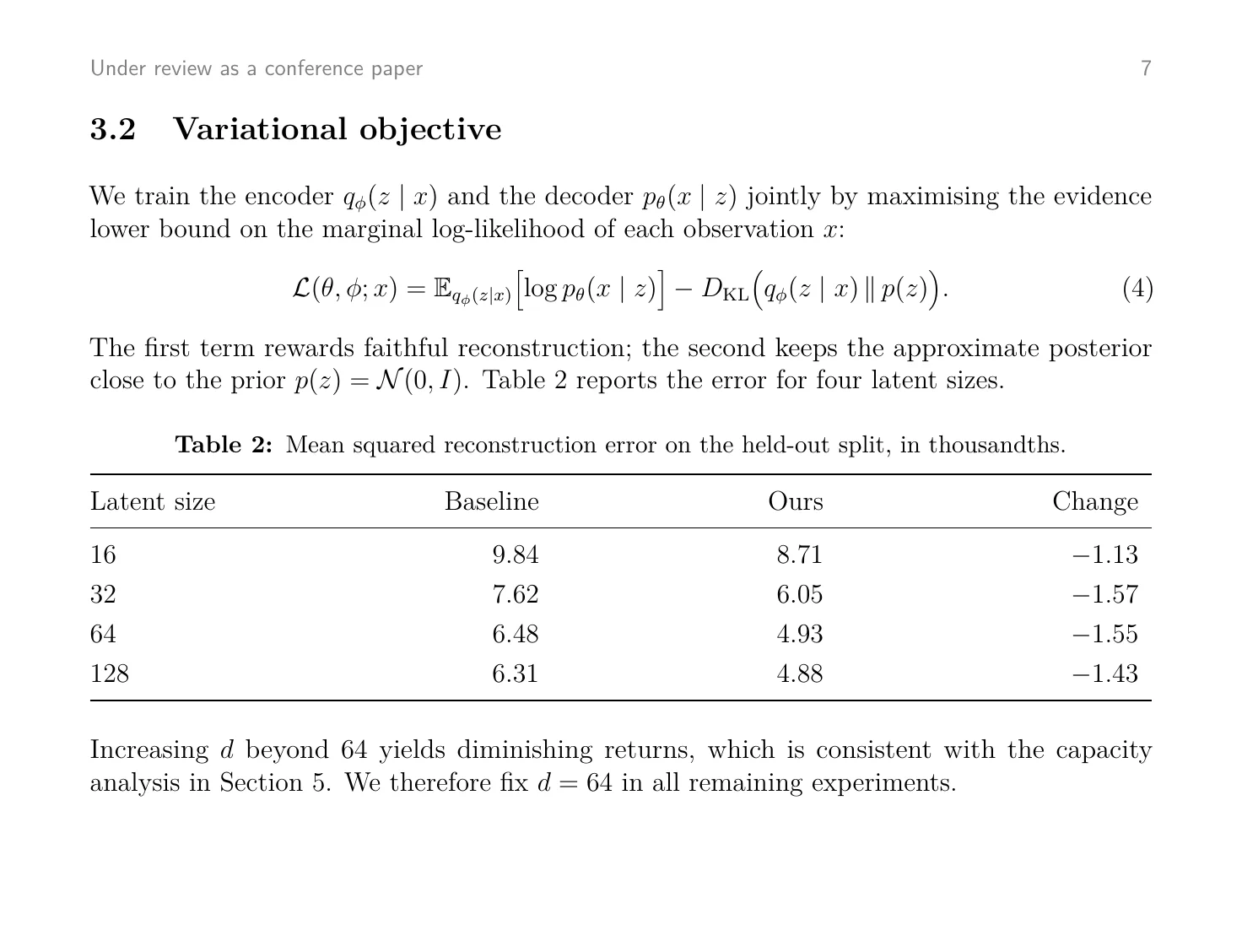
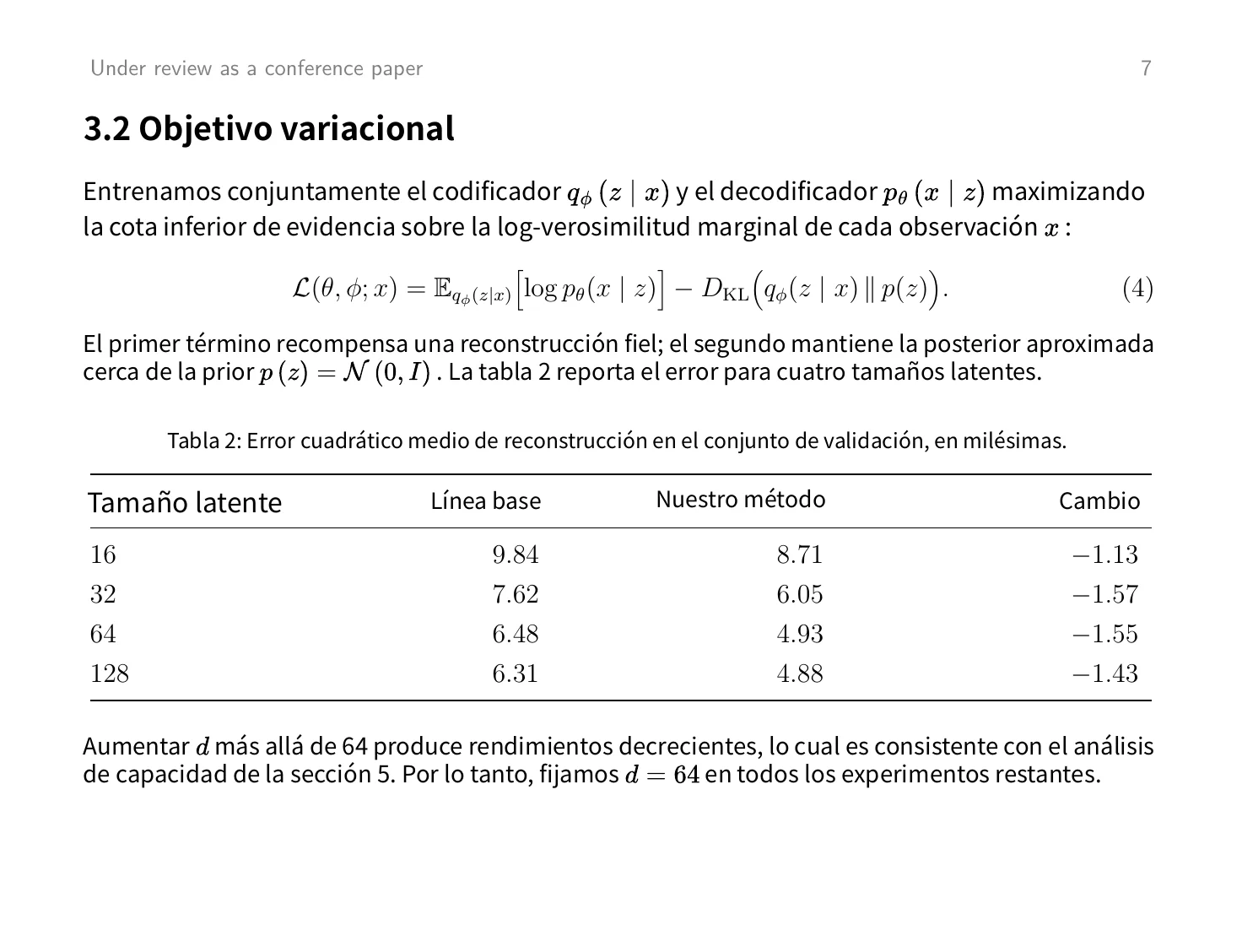
Not a mock-up. The translation is what Doc2X returned on 15 November 2026 with the standard model, unretouched. Open the PDF that went in and the PDF that came back.
Built for papers
What breaks in other translators is the part you need.
Reading order, left column first 01
Two columns, read in the right order
A two-column page is not read straight across the gutter. Doc2X works out the order a person reads it in before translating, so sentences are not spliced from one column into the other.
OriginalEnglish TranslationEspañol 02
Numbered equations stay numbered
Each numbered equation is kept exactly as the authors set it, with its number. When the text says “substituting (4) into (7)”, both are where you expect them.
OriginalEnglish TranslationEspañol 03
Results tables stay comparable
Column headers are translated; the numbers, units and alignment are left exactly as they were.
- Split viewOriginalTranslation
04
The source is always one glance away
For a claim that matters, read the original sentence. The split view keeps both versions of the page next to each other.
How it works
From PDF to reading in three steps.
01
Upload the paper
A PDF from arXiv, a journal or your own drafts folder. Scanned papers work as well.
02
Pick the language
Choose one of 11 target languages. Paid plans translate with the whole paper as context, which keeps terms consistent from abstract to appendix.
03
Read side by side
Read the original and the translation next to each other. On paid plans you can also export Markdown or LaTeX to quote from and take notes in.
The fine print
What it takes and what it gives back.
Better to know before you upload. The last list is what it does not do today.
- Files
- PDF: preprints, journal articles, theses, technical reports. Digital or scanned.
- File size
- 20 MB on Free, 200 MB on Starter, 500 MB on Pro
- Languages
- English, Spanish, Portuguese (Brazil and Portugal), German, French, Japanese, Korean, Simplified and Traditional Chinese, and Russian (beta)
- Result
- A translated PDF with the original layout, read beside the original
- Exports
- Translated PDF on every plan, alone or with the original beside it. Word (.docx), Markdown (.md), LaTeX (.tex) and Typst (.typ) on Starter and Pro.
- Terminology
- On Starter and Pro the translation uses the whole paper as context, which keeps terms consistent
- References
- The reference list is left in its original language, so titles and names can still be looked up
- Cost
- Half a credit a page with the standard model; the total is shown before the task starts. The free plan has 50 credits a month, about 100 pages. A task that fails is not charged.
- Storage
- Uploaded files and results are deleted automatically within 31 days
Not a fit yet
- A link to a paper. Download the PDF and upload the file.
- Arabic and other right-to-left target languages. The translation comes out in the wrong reading direction.
How do I translate a research paper?
Upload the PDF and choose a language. Doc2X rebuilds the structure of each page (columns, equations, tables, figures, references), translates the prose, and sets it back into the same layout.
Can I translate a paper from arXiv?
Yes. Download the PDF from arXiv and upload it. Two-column and single-column papers both work.
Are the equations kept as LaTeX?
In the translated PDF, numbered equations are kept exactly as the authors typeset them. On Starter and Pro you can also export Markdown or LaTeX, where every equation comes as LaTeX source you can edit.
Does it keep technical terms consistent?
On Starter and Pro the translation uses the whole paper as context, which keeps terminology consistent from the abstract to the appendix. It is on by default.
Can I read the original and the translation side by side?
Yes. The reader shows the original PDF on one side and the translation on the other and scrolls them together. Paid plans add a view with the translation as Markdown beside the PDF.
Is the reference list translated?
No. References are left in their original language so that titles and author names can still be searched. Everything else on the page is translated, including the labels inside figures.
Is it free?
The free plan gives you 50 credits every month, about 100 pages with the standard model, and takes PDFs up to 20 MB. No card is needed. You see what a paper costs before it starts, and a task that fails is not charged.
Is it safe to upload an unpublished paper?
Files are uploaded over an encrypted connection, used to produce your translation, and deleted automatically within 31 days. Unless you explicitly agree, your files are not used to train AI models offered to the public or to other customers.
Bring the paper you keep putting off.
Start on the free plan. No card needed.