Turn a PDF into slides you can edit.
Pick a document and Doc2X writes a deck from it: a title slide, lists, tables and statements, each with what to say under it. Change any slide, present from the browser, or download a PowerPoint file and carry on there.
Make slides from a document

- Made from
- One of your documents, a PDF you upload there, or notes you paste
- Length
- Short, Standard or Long: about 6, 10 or 16 slides
- Language
- That of the document, or one of 12 you choose
Free plan: 50 credits every month, no card needed. A deck costs 5.
Nothing at hand? See the deck a two-page report came back as
- From
- A PDF, a Word or PowerPoint file, a document you translated here, or notes you paste
- Back
- About 6, 10 or 16 slides with speaker notes, to edit, present and download as .pptx
- Cost
- 5 credits a deck, charged when it is ready. Reading a PDF that is new here: a quarter of a credit a page
One report, one deck
Six slides from two pages.
Step through the deck. It is what came back for a two-page sales report, asked for as a ten-minute briefing: every slide as the browser presents it, with the notes the deck has for it underneath.
- 01The table of regions came back as a table slide: its six rows, each number as in the report.
- 02A finding from the report’s opening paragraph became a statement slide of its own.
- 03We compared every figure on the slides and in the notes with the report. All of them agree.
- 04The deck says what it was written from: both pages of the report, and for each slide of content the page it draws on.
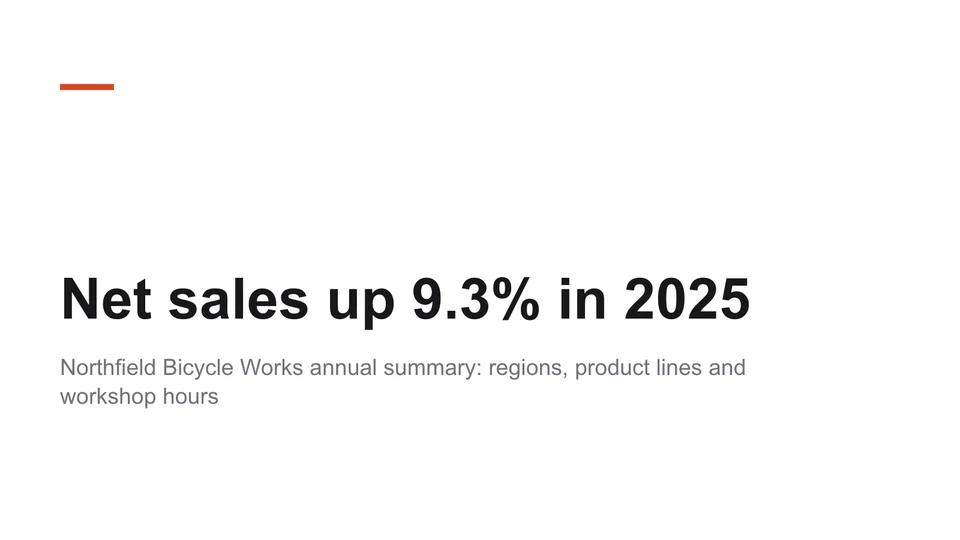

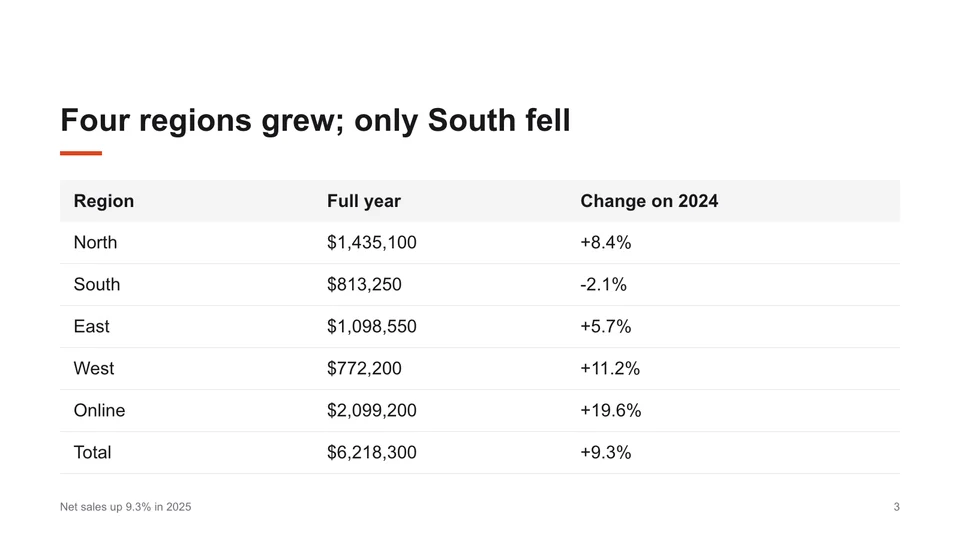
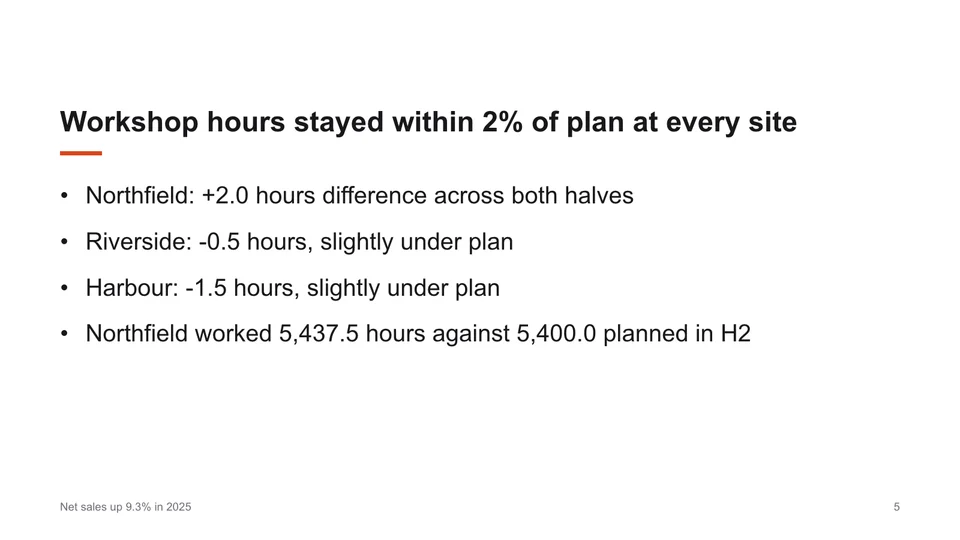
Slide 1 of 6 Title slide
Speaker notes of this slide
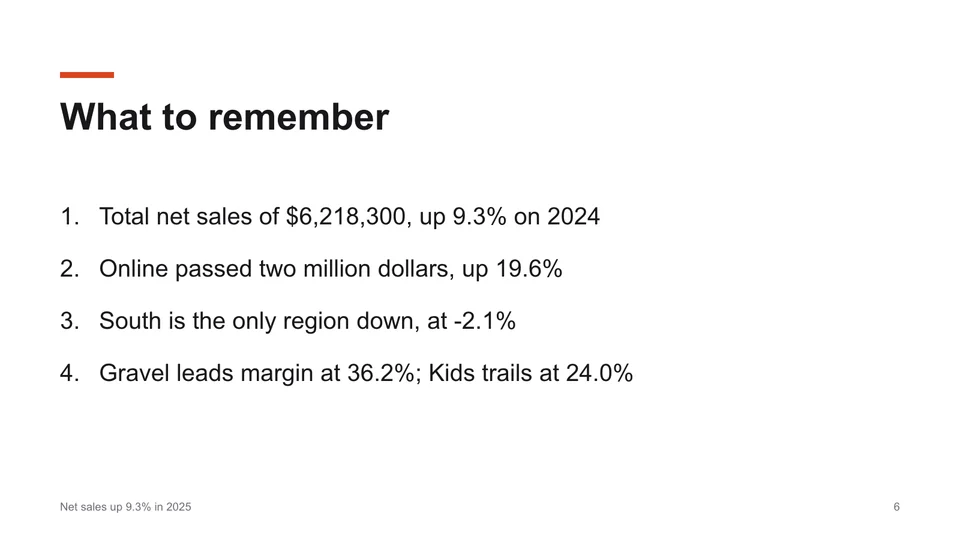
This is a ten-minute briefing for the management team on the 2025 annual summary prepared for wholesale partners. All amounts are in US dollars. The headline is $6,218,300 in net sales, up 9.3% on 2024, with growth in four of the five regions.
Not a mock-up. This is the deck Doc2X returned on 20 November 2026 for a 2-page report of our own (the company and its figures are invented), asked for as Short, in English, with “A ten-minute briefing for the management team” under “What is it for?”. It opened 8.4 seconds after the click on Create slides. The pictures are its slides as the browser presents them and the notes are the deck's; nothing was changed after it came back. Open the PDF that went in and the PowerPoint file that came back.
Why it saves the evening
A first draft you would have written.
Slide 3Table 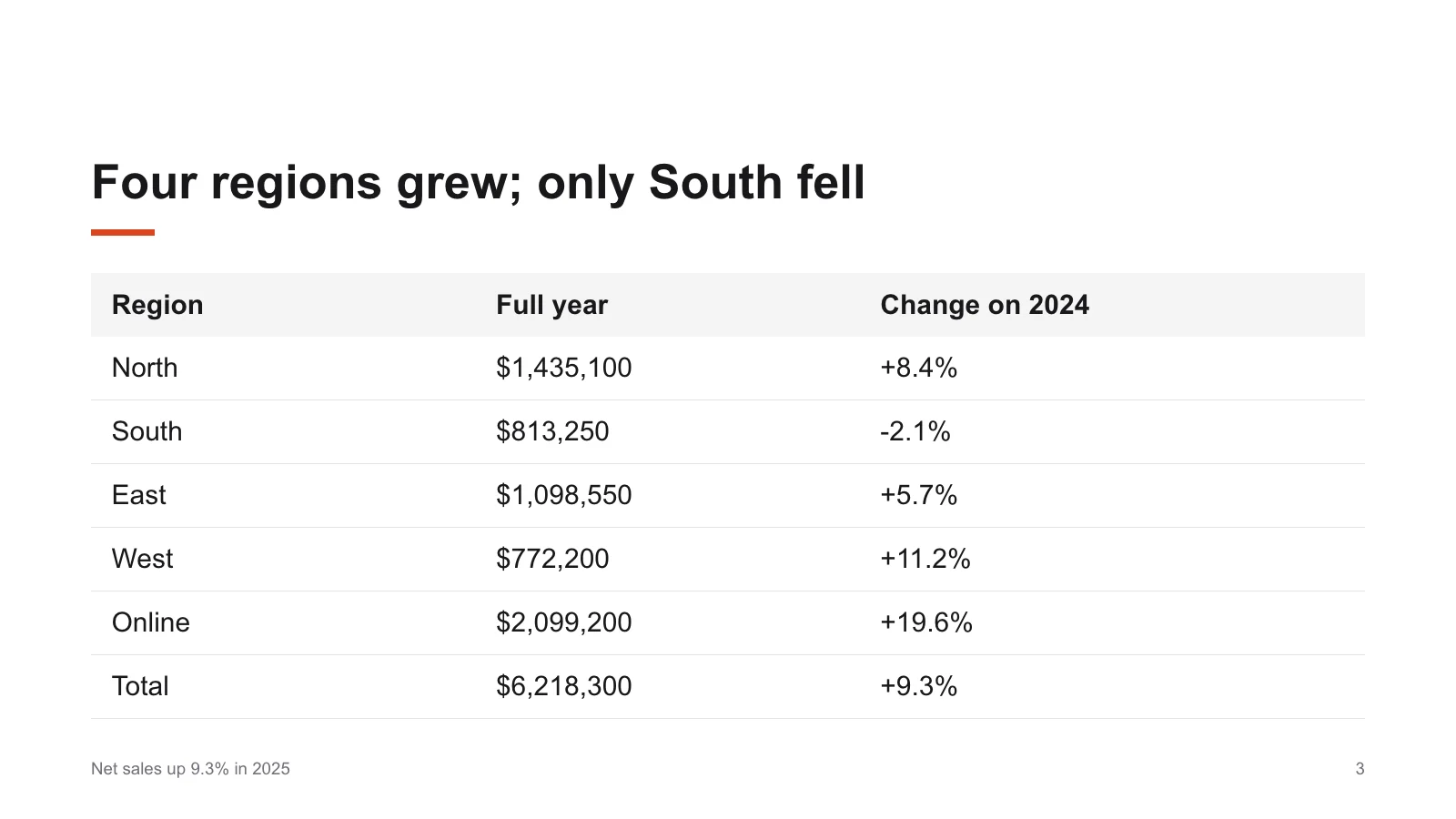
Statement Two columns 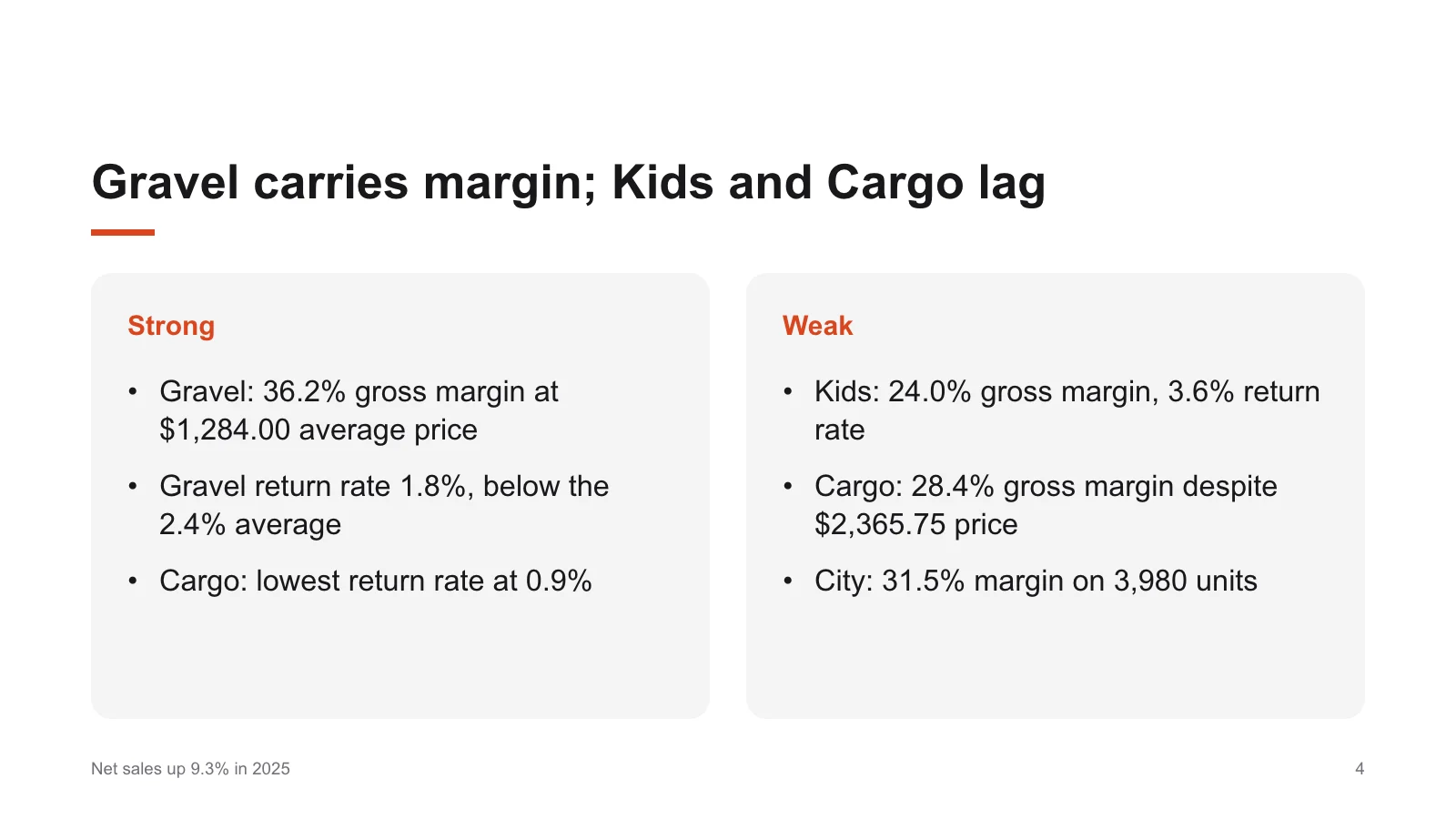
Three of the 6 slides that came back, each of another kind
01
A slide takes the shape of what it says
Numbers that belong in rows became a table. Two groups set against each other became two columns. A finding the report opens with became a statement. Any slide can be turned into another kind afterwards, and what it says goes along.
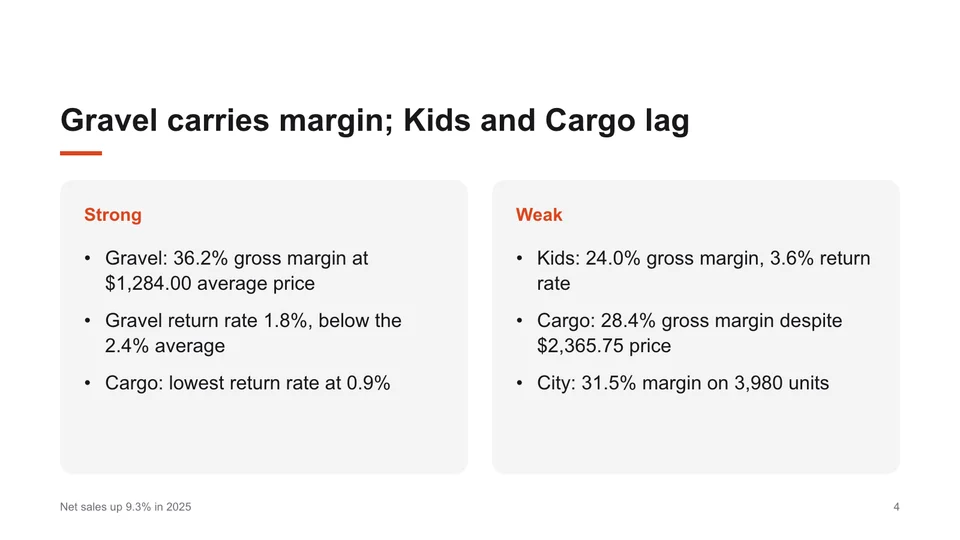
- Slide 4Two columns
Speaker notesAs written
Gravel is the standout: 2,105 units at a $1,284.00 average price and a 36.2% margin. Kids has the lowest margin at 24.0% and the highest return rate at 3.6%. Cargo sells few units, 615, but at the highest price, $2,365.75, with a 28.4% margin. Across all lines the margin is 32.3% on 8,905 units, which includes 204 demonstration bikes sold to partner shops at cost.
The slide, and what the deck gives the presenter to say with it 02
What to say is written too
Under every slide are speaker notes, written from the document: here, the figures behind the two columns, ready to be said aloud. They go into the PowerPoint file as notes.
LookInk 
LookPaper 
LookNavy 
One slide of the deck in three of the six looks
03
Change it before anyone sees it
Every title, point and table cell can be changed, slides added, copied, moved and removed, and a single slide written again for one credit. Six looks change the colours of the whole deck; the look is saved with it.
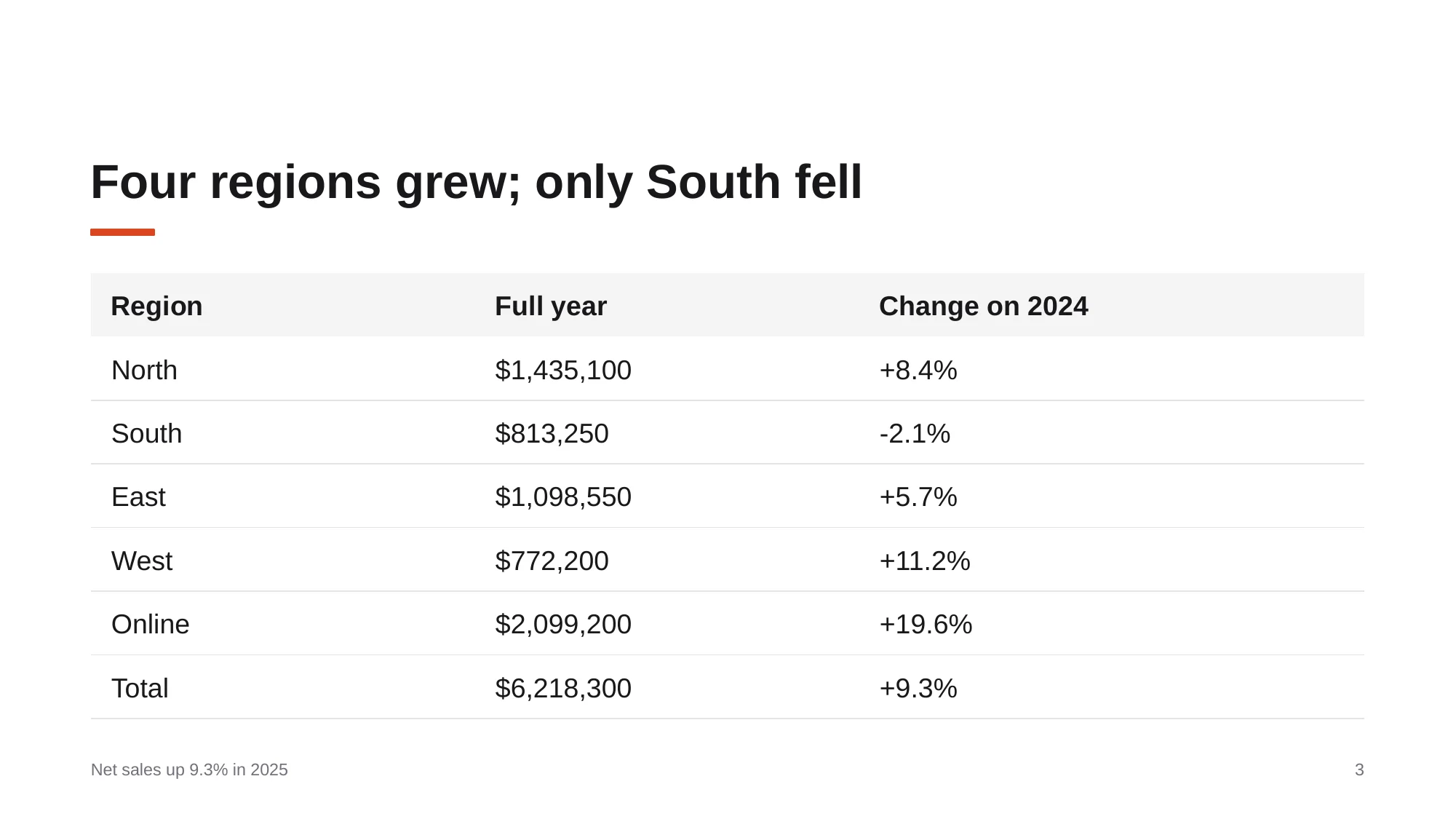
- Net-sales-up-9-3-in-2025.pptxIn LibreOffice Impress
- Size
- 108 KB
- Slides
- 6
- Notes pages
- 6
- Runs of text
- 55
- Tables
- 1
- Pictures
- 0
The file that was downloaded, and what its parts hold 04
A file you can go on working in
Download saves a .pptx in which text is text, the table is a table and the notes are notes. Nothing in it is a picture of a slide. This is the file from this page, open in LibreOffice Impress.
How it works
Three steps from document to deck.
01
Choose what it is made from
Open Slides and pick one of your documents, or upload a PDF, a Word or a PowerPoint file there. Notes work too: paste up to 12,000 characters of an outline, an abstract or minutes.
02
Say how long, and in which language
Short, Standard or Long: about 6, 10 or 16 slides. You can add who it is for and how much time you have. The page shows what the deck costs and how many credits you have before you start.
03
Edit, present, download
The deck is usually ready in under a minute and opens by itself; the one on this page took 8 seconds. Change what you like, present from the browser, or download the PowerPoint file.
The fine print
What it takes and what it gives back.
Better to know before you start. The last list is what it does not do today.
- Made from
- A document you have translated or converted here; a PDF uploaded on the Slides page (read first, at a quarter of a credit a page); a Word or PowerPoint file (.docx, .doc, .pptx, .ppt: turned into a PDF first, at no cost); or notes you paste, up to 12,000 characters
- Length
- Short, Standard or Long: about 6, 10 or 16 slides. Slides can be added and removed afterwards, up to 40 in a deck
- Kinds of slide
- Title slide, section heading, list, numbered list, two columns, table, statement, quotation and steps
- On one slide
- A title of up to 140 characters; up to 7 points or steps; a table of up to 6 columns and 8 rows; speaker notes of up to 1,500 characters
- Languages
- The language of the material, or one of 12 you choose: Arabic, Chinese (Simplified or Traditional), English, French, German, Italian, Japanese, Korean, Portuguese (Brazil), Russian or Spanish. A slide written in Arabic runs from the right
- Editing
- Every text on a slide and its kind; slides added, copied, moved and removed; undo and redo; six looks for the whole deck. Changes are saved as you make them
- Writing a slide again
- One slide at a time: shorter, as three points, in simpler words, closer to the document, or as you say in up to 300 characters. 1 credit, taken when the slide is written
- Pictures
- On Starter and Pro a picture can be made for a title slide or a list, at 12 credits a picture
- Presenting
- From the browser, on the whole screen
- Download
- A PowerPoint file (.pptx). Lists, tables, quotations, steps and speaker notes stay what they are
- Long documents
- The slides are written from the text of the document. Of a very long one the first part is read in full and the rest by its headings; the deck then says how many pages were read
- Cost
- 5 credits a deck on every plan, charged when it is ready; a deck that could not be written costs nothing. Changing, presenting and downloading cost nothing
- Limits
- Two decks in the making at a time, and up to 20 in 10 minutes
- Storage
- A deck is kept for 31 days and then deleted. Download the ones you want to keep
Not a fit yet
- The pages of the PDF as slides. This writes a presentation about the document; it does not turn each page into a slide. For the pages themselves in an editable file, convert the PDF to Word.
- Figures of the document on the slides. The deck is written from the text, and formulas are written as plain text.
- Charts. Numbers come as tables and statements, not as bars or lines.
- A template of your own. The six looks change the colours of a deck; a company template cannot be loaded.
How do I turn a PDF into slides?
Open Slides, upload the PDF or pick a document you already have here, choose a length and a language, and click Create slides. The deck is usually ready in under a minute. You can change every slide, present it from the browser and download it as a PowerPoint file.
Is it free?
The free plan gives you 50 credits every month and needs no card. A deck costs 5 credits, and reading a PDF that is new here a quarter of a credit a page. A 20-page report and its deck come to 10 credits: five of those in a month of the free plan.
Is this a PDF to PowerPoint converter?
Not in the sense of one slide for each page. It reads the document and writes a presentation about it: a title slide, the main points, tables for the numbers, a closing slide, and speaker notes for each. The result downloads as a PowerPoint file. If you want the pages themselves in an editable file, PDF to Word does that.
Can I trust the numbers on the slides?
Check them. The slides are written by a language model from the text of your document. In the deck on this page every figure agrees with the report, and we can say so because we compared them one by one. Do the same before you present.
Can I edit the slides?
Yes, in the browser: titles, points, tables, the kind of each slide, their order and the speaker notes. One slide can be written again for a credit. Or download the PowerPoint file and edit it there.
How long a document can it take?
Any length you can upload. The slides are written from the text of the document. Of a very long one the first part is read in full and the rest by its headings, and the deck says how many of the pages were read.
Which languages can the slides be in?
The language of the document, or one of 12 you choose: Arabic, Chinese (Simplified or Traditional), English, French, German, Italian, Japanese, Korean, Portuguese (Brazil), Russian or Spanish. A paper in English can come back as a deck in Japanese.
What happens to my document and the deck?
The document is uploaded over an encrypted connection and deleted automatically within 31 days; a deck is kept for 31 days and then deleted, and you can delete it sooner. Unless you explicitly agree, your files are not used to train AI models offered to the public or to other customers.
Bring the report you have to present.
Start on the free plan. No card needed.